

Facebook LinkedIn Email What Is Technical Expertise? Why It Matters in Today’s Competitive Market What Is Technical Expertise? Technical expertise refers to a person’s deep knowledge and skills in a specific technical field such as IT, engineering, software development, electronics, or machinery. It goes beyond basic understanding—technical experts can design, troubleshoot, and improve systems based on their hands-on experience and advanced knowledge. Why Technical Expertise Is Crucial In a world increasingly powered by technology, businesses need technical experts to: ✅ Solve complex problems quickly ✅ Innovate and improve products or systems ✅ Train teams and support clients ✅ Increase operational efficiency ✅ Maintain a competitive edge Whether you’re building a mobile app, managing servers, or running a cellphone repair shop, technical skills are the backbone of delivering high-quality service. Examples of Technical Expertise Here are real-world examples from different industries: Industry Example of Technical Expertise IT & Software Programming in Python or Java, cloud infrastructure management Repair & Maintenance Diagnosing and fixing smartphones or electronics Engineering Designing mechanical systems or working with CAD software Digital Marketing Mastery of SEO tools, Google Analytics, automation platforms Customer Service Using CRM systems, live chat platforms, ticketing systems Key Components of Technical Expertise In-depth Knowledge – Understanding tools, systems, or processes deeply Hands-on Experience – Real-world application of skills Problem-Solving Abilities – Quickly identifying and fixing technical issues Continuous Learning – Staying up to date with the latest tools and trends Certifications & Training – Earning qualifications that validate your skills How to Build Technical Expertise Whether you’re an individual or managing a team, here’s how to develop strong technical abilities: 1. Get Certified Enroll in courses (online or in-person) for areas like software, cloud systems, data analysis, or electronics. 2. Practice Regularly Apply what you learn by working on real-world projects or volunteering. 3. Stay Updated Technology evolves fast. Follow industry news, blogs, webinars, or YouTube channels. 4. Use Tools & Platforms Master the tools of your field—like CRMs, design software, or IDEs (Integrated Development Environments). 5. Join Tech Communities Engage in forums like Stack Overflow, GitHub, or Reddit to ask questions and share solutions. The Role of Technical Expertise in Business For businesses, having employees or vendors with strong technical expertise means: Faster problem resolution Better product and service quality Higher customer satisfaction Improved workflows and automation More informed decision-making For example, a cellphone repair business with technically trained staff can offer quicker diagnostics, better repairs, and confident customer service. Conclusion Technical expertise is a key driver of success in today’s technology-driven world. Whether you’re a technician, engineer, marketer, or business owner, deep technical knowledge empowers you to work smarter, solve problems faster, and stay ahead of the curve. Invest in your technical growth—it’s the smartest move you can make.

Online Mobile Display Repair: Get Your Phone Screen Fixed Without Leaving Home
Facebook Email LinkedIn Online Mobile Display Repair: Get Your Phone Screen Fixed Without Leaving Home Introduction A cracked or unresponsive phone screen can be frustrating, especially when you rely on your mobile for everything—from work and school to social media and payments. But thanks to modern tech services, online mobile display repair is now possible—letting you book a screen replacement or repair without leaving your home. This guide explains how online mobile display repair works, what to expect, and where to find the most reliable services. What Is Online Mobile Display Repair? Online mobile display repair is a service that allows you to book a phone screen repair through a website or app. Depending on your location and service provider, a technician may come to your home, or you can ship your device to a repair center. This method saves you time and eliminates the need to visit a repair shop in person. Common Display Issues Fixed Online Cracked or shattered screen Unresponsive touch screen Flickering or black display Lines or dead pixels on the screen Burn-in on OLED displays How Online Mobile Display Repair Works 1. Visit the Website or App Choose a trusted service provider and go to their site or mobile app. 2. Select Your Phone Model and Issue Pick your phone’s make, model, and describe the display problem. 3. Get a Repair Quote You’ll receive a price estimate based on the issue and your location. 4. Book a Time Slot Choose a convenient time for a technician to visit your home, or arrange pickup/delivery. 5. Repair Process Begins A certified technician will repair your phone using original or high-quality parts. 6. Device Return or On-the-Spot Repair In most cases, repairs take less than 60 minutes if done on-site. If shipped, expect a 2–5 day turnaround. Benefits of Online Mobile Display Repair ✅ Convenience – No need to leave your home or wait in queues.✅ Speed – Same-day or next-day repair options available.✅ Affordability – Competitive pricing, often cheaper than brand-authorized centers.✅ Certified Technicians – Skilled professionals with experience handling your phone model.✅ Warranty on Repairs – Most services offer a limited warranty for parts and labor. Popular Online Mobile Display Repair Services Here are some of the top-rated services offering online screen repairs: Service Name Location Coverage Highlights uBreakiFix USA & Canada Same-day screen repair, warranty iFixScreens Select U.S. cities Free diagnostic, walk-in or mail-in Cashify Repair India Doorstep service, instant quotes UrbanClap (Urban Company) India On-demand home screen repairs Quick Mobile Fix UK Mail-in repairs, quality parts Note: Availability varies by country and city. What to Check Before Choosing a Service Customer reviews and ratings Transparent pricing Data privacy and protection Type of parts used (OEM, aftermarket, refurbished) Warranty terms Tips to Protect Your Mobile Display After Repair Use a tempered glass screen protector Always keep your phone in a protective case Avoid dropping your phone on hard surfaces Don’t put pressure on the screen while charging or resting Keep the phone away from moisture and heat Conclusion If you’ve been putting off fixing your cracked or damaged phone screen, now’s the time to act. Online mobile display repair makes the process easy, fast, and affordable—so you can get back to using your phone without the hassle. Whether you choose doorstep repair or mail-in service, make sure to pick a provider with solid reviews, certified technicians, and a good warranty policy. The best part? You don’t even need to leave your home.

Complete List of Cell Phone Manufacturers in 2025
Facebook Email LinkedIn Introduction The mobile phone industry is massive and growing fast. With so many brands releasing new smartphones every year, users often wonder: Who makes all these phones? From industry giants to rising tech startups, here’s a complete and updated list of cell phone manufacturers in 2025. Whether you’re planning to buy a new phone or researching the industry, this guide will help you understand which brands lead the global market. Top Global Cell Phone Manufacturers (2025) 1. Apple Inc. (USA) Famous for the iPhone series Known for iOS, premium design, and ecosystem integration Strong global presence, especially in North America and Europe 2. Samsung Electronics (South Korea) Offers phones from entry-level to high-end (Galaxy series) Known for AMOLED displays, innovation, and Android OS One of the world’s biggest mobile phone producers 3. Xiaomi (China) Popular for budget-friendly and mid-range smartphones Brands under Xiaomi: Redmi, POCO, and Mi Rapidly growing in Asia, Europe, and Latin America 4. Oppo (China) Focuses on stylish designs and high-quality cameras Operates under BBK Electronics 5. Vivo (China) Known for innovation in camera technology and design Another BBK Electronics brand, like Oppo and OnePlus 6. OnePlus (China) Targets the premium mid-range segment Offers clean software (OxygenOS) and fast performance 7. Realme (China) Budget-friendly phones with strong performance Gaining popularity among younger users globally 8. Huawei (China) Once a major global player; now focuses more on domestic (China) market due to U.S. sanctions Produces flagship phones with advanced hardware 9. Motorola (USA, owned by Lenovo) Strong presence in North and South America Offers budget and mid-range Android phones 10. Google (USA) Makes Pixel smartphones Known for clean Android experience and great cameras Emerging and Niche Manufacturers 11. Nokia (Finland, owned by HMD Global) Known for strong build quality and clean Android One software Focuses on affordability and simplicity 12. Sony (Japan) Specializes in high-end phones with 4K displays and powerful cameras Niche market mostly in Japan and Europe 13. Asus (Taiwan) Focuses on gaming phones (ROG series) and budget-friendly ZenFone series 14. Tecno & Infinix (Transsion Holdings, China) Popular in Africa and South Asia Affordable devices for budget-conscious markets 15. Honor (China) Former sub-brand of Huawei; now operates independently Offers mid-range and flagship Android smartphones What Makes These Manufacturers Stand Out? Brand Known For Price Range Apple Ecosystem, Security High-End Samsung Display, Innovation All Ranges Xiaomi Affordability, Value Low to Mid OnePlus Performance, Clean UI Mid to High Realme Youth-Oriented, Budget Devices Budget Google Software & Camera Mid to High Conclusion This list of cell phone manufacturers shows the diversity of today’s smartphone market. Whether you’re looking for cutting-edge tech or affordable functionality, there’s a brand for every need and budget. The best choice depends on your priorities—performance, price, brand loyalty, or design. Stay informed and always compare specs, software, and user reviews before making your next phone purchase.

Why Local Repair Shops for Phones Are Still the Best Choice in 2025
Facebook LinkedIn Email Why Local Repair Shops for Phones Are Still the Best Choice in 2025 In an era of mail-in tech support, long warranty claim processes, and costly brand service centers, local repair shops for phones continue to be the go-to solution for millions of users worldwide. Whether it’s a cracked screen, battery issue, or water damage—local shops often deliver better value, faster service, and more personalized support than big tech chains. If you’re searching for “phone repair near me”, here’s why your local phone repair shop might just be your best option. 1. Faster Turnaround Times Local phone repair shops typically offer same-day or even while-you-wait repair services for common problems like: Screen replacements Battery swaps Charging port fixes Speaker/mic repairs Software resets This is a major advantage over shipping your phone away for days or weeks. 2. Affordable Pricing Compared to official brand repair centers, local shops offer competitive prices—often without sacrificing quality. You can: Get quotes upfront Choose between OEM and high-quality third-party parts Avoid hidden charges or diagnostic fees This makes phone repair more accessible for everyday users. 3. Personalized Service Unlike large service chains, local repair shops build relationships with their customers. You can speak directly with the technician, explain your issue, and even get helpful maintenance tips. That one-on-one experience helps build trust, which keeps customers coming back. 4. Support for All Brands and Models Local repair technicians are often trained across multiple brands—not just one. They can repair: iPhones (all series) Samsung Galaxy & Note Xiaomi, Oppo, Vivo Google Pixel and more Many local shops also service tablets, laptops, and smartwatches. 5. Transparent and Honest Repairs Reputable local shops are known for transparency. They’ll explain what went wrong, what needs to be fixed, and give you options based on your budget. Some even let you watch the repair process—so there are no surprises. 6. Boosts the Local Economy By choosing a local repair shop, you’re supporting a small business in your community. These businesses: Create jobs Offer apprenticeships to young technicians Keep money circulating within the local economy It’s a small choice that makes a big difference. 7. Convenient Access and Communication Most local shops are centrally located—inside malls, near markets, or on busy main roads. No long drives or shipping labels required. You can: Walk in for a quick fix Call or WhatsApp for a quote Book online and drop off at your convenience Some even offer pickup and delivery services in your area. Final Thoughts Local repair shops for phones remain a reliable and customer-friendly choice in 2025. They offer fast, affordable, and honest service that big tech brands and mail-in repair options often can’t match. So the next time your device breaks, consider your trusted neighborhood repair shop first. Looking to modernize your own local repair business? rolt.store helps phone repair shops manage repairs, customers, and inventory with a powerful CRM tailored to your needs.

C & C Cellphone and Computer Repair: Your Local Tech Repair Experts
Facebook LinkedIn Email C & C Cellphone and Computer Repair: Your Local Tech Repair Experts When your smartphone breaks or your computer crashes, it can disrupt your entire day—or even your work. That’s where C & C Cellphone and Computer Repair comes in. Known for quick, affordable, and dependable service, C & C is your go-to local shop for all device repair needs. Whether you’re dealing with a cracked iPhone screen, a virus-infected laptop, or a slow tablet, our certified technicians are ready to help. What We Repair At C & C, we specialize in: Cellphone Repair Screen replacements Battery changes Charging port repairs Water damage treatment Software updates and resets Computer & Laptop Repair Virus removal and clean-up Keyboard and screen replacement Data recovery RAM and SSD upgrades OS installation and troubleshooting Tablet Repairs Cracked screens Battery and charging issues Touchscreen malfunctions No matter the device or brand—Apple, Samsung, HP, Dell, Lenovo, or others—we’ve got the expertise to fix it fast. Why Choose C & C Cellphone and Computer Repair? ✅ Fast Turnaround: Most repairs are completed within the same day. ✅ Affordable Pricing: Transparent quotes with no hidden charges. ✅ Certified Technicians: Skilled professionals with years of experience. ✅ Quality Parts: We use only premium-grade replacement components. ✅ Customer Satisfaction: Hundreds of 5-star reviews and loyal customers. Serving Our Community with Care We’re more than just a repair shop—we’re part of your community. Whether you’re a student, working professional, or small business owner, we treat every repair with care and urgency. We also offer bulk repair options for schools, offices, and local organizations, ensuring your devices stay up and running with minimal downtime. Final Thoughts When it comes to your devices, don’t trust just anyone. C & C Cellphone and Computer Repair delivers honest service, reliable results, and fair pricing. Whether it’s your phone, tablet, or computer, we’ll fix it—fast.

How to Start a Cell Phone Repair Business in 2025: Complete Beginner’s Guide
Facebook Email LinkedIn How to Start a Cell Phone Repair Business in 2025: Complete Beginner’s Guide With millions of smartphones in use and accidents happening every day, cell phone repair is one of the most in-demand and profitable small business opportunities in 2025. Whether it’s a broken screen, battery issue, or software glitch—users want fast, reliable, and affordable repair solutions. If you’re interested in launching your own cell phone repair business, this guide will walk you through the key steps, from learning the trade to running a successful operation. 1. Why Start a Cell Phone Repair Business? Here’s why this industry is booming: High smartphone usage means constant repair demand Low startup investment compared to other businesses Potential to earn repeat customers and long-term revenue You can operate from home, a retail location, or even on-the-go 2. Learn the Necessary Repair Skills You don’t need to be a tech expert to start, but you do need basic repair skills or someone on your team who has them. You can: Take an online or local mobile repair course Get certified in iPhone and Android repair Practice on old or damaged phones to build hands-on experience Key repair services to master: Screen replacements Battery changes Charging port repairs Water damage fixes Speaker, mic, and button issues Software resets and updates 3. Choose a Business Model Decide how you want to operate: Retail Storefront – Traditional setup in a busy area Home-Based Repair Business – Cost-effective for startups Mobile Technician Service – Travel to customers’ locations Pickup & Delivery – Convenient and increasingly popular Choose a model that matches your budget, experience, and goals. 4. Buy Tools and Spare Parts Here’s a list of essential tools: Screwdriver kits, pry tools, tweezers Heat gun or rework station Display separators and screen holders Battery testers Cleaning solutions and anti-static mats Partner with trusted suppliers to source quality replacement parts for iPhones, Samsung, Xiaomi, Oppo, and more. 5. Register Your Business Legally To operate professionally: Pick a business name and register it Get any required licenses or permits Open a business bank account Consider business insurance for liability protection This step builds customer trust and allows you to scale later. 6. Set Up Your Online Presence In 2025, being online is non-negotiable. Your business should have: A website with service list, pricing, and booking options Google Business Profile for local SEO visibility Active social media pages to post updates, reviews, and offers A CRM system like Osso.AI helps you automate bookings, track customer records, manage inventory, and send repair updates—all from one dashboard. 7. Offer Great Customer Experience Your success depends on how well you serve customers. Focus on: Fast turnaround times Honest pricing and service recommendations Offering warranties on repairs Keeping customers informed about progress Following up after service These practices earn repeat business and 5-star reviews. 8. Market Your Business Locally Use these strategies to attract your first customers: Flyers and posters in local shops or colleges Google and Facebook Ads for targeted reach Partnering with phone accessory stores or tech retailers Offering discounts for referrals or first-time users As you grow, keep track of what works and refine your strategy. 9. Manage Your Operations Smartly As you handle more repairs, it becomes harder to manage everything manually. That’s where Osso.AI makes a difference. It helps you: Organize customer data Track every repair job Manage spare parts inventory Automate reminders and updates Generate sales and performance reports This lets you run your repair business like a pro from day one. Final Thoughts Starting a cell phone repair business in 2025 is a smart and achievable goal—even if you’re starting small. With basic skills, reliable tools, and the right marketing approach, you can grow into a trusted local brand. Add automation and smart management tools like Osso.AI, and you’ll scale faster while keeping customers happy. Want help setting up your CRM, website, or operations system? Contact Osso.AI today and let us help you build a repair business that works smarter.
List of Cell Phone Manufacturers in 2025 | Top Global Brands
Introduction The mobile phone industry is massive and growing fast. With so many brands releasing new smartphones every year, users often wonder: Who makes all these phones? From industry giants to rising tech startups, here’s a complete and updated list of cell phone manufacturers in 2025. Whether you’re planning to buy a new phone or researching the industry, this guide will help you understand which brands lead the global market. Top Global Cell Phone Manufacturers (2025) 1. Apple Inc. (USA) Famous for the iPhone series Known for iOS, premium design, and ecosystem integration Strong global presence, especially in North America and Europe 2. Samsung Electronics (South Korea) Offers phones from entry-level to high-end (Galaxy series) Known for AMOLED displays, innovation, and Android OS One of the world’s biggest mobile phone producers 3. Xiaomi (China) Popular for budget-friendly and mid-range smartphones Brands under Xiaomi: Redmi, POCO, and Mi Rapidly growing in Asia, Europe, and Latin America 4. Oppo (China) Focuses on stylish designs and high-quality cameras Operates under BBK Electronics 5. Vivo (China) Known for innovation in camera technology and design Another BBK Electronics brand, like Oppo and OnePlus 6. OnePlus (China) Targets the premium mid-range segment Offers clean software (OxygenOS) and fast performance 7. Realme (China) Budget-friendly phones with strong performance Gaining popularity among younger users globally 8. Huawei (China) Once a major global player; now focuses more on domestic (China) market due to U.S. sanctions Produces flagship phones with advanced hardware 9. Motorola (USA, owned by Lenovo) Strong presence in North and South America Offers budget and mid-range Android phones 10. Google (USA) Makes Pixel smartphones Known for clean Android experience and great cameras Emerging and Niche Manufacturers 11. Nokia (Finland, owned by HMD Global) Known for strong build quality and clean Android One software Focuses on affordability and simplicity 12. Sony (Japan) Specializes in high-end phones with 4K displays and powerful cameras Niche market mostly in Japan and Europe 13. Asus (Taiwan) Focuses on gaming phones (ROG series) and budget-friendly ZenFone series 14. Tecno & Infinix (Transsion Holdings, China) Popular in Africa and South Asia Affordable devices for budget-conscious markets 15. Honor (China) Former sub-brand of Huawei; now operates independently Offers mid-range and flagship Android smartphones What Makes These Manufacturers Stand Out? Brand Known For Price Range Apple Ecosystem, Security High-End Samsung Display, Innovation All Ranges Xiaomi Affordability, Value Low to Mid OnePlus Performance, Clean UI Mid to High Realme Youth-Oriented, Budget Devices Budget Google Software & Camera Mid to High Conclusion This list of cell phone manufacturers shows the diversity of today’s smartphone market. Whether you’re looking for cutting-edge tech or affordable functionality, there’s a brand for every need and budget. The best choice depends on your priorities—performance, price, brand loyalty, or design. Stay informed and always compare specs, software, and user reviews before making your next phone purchase. Facebook LinkedIn Email

What is Microsoft Dynamics CRM? Features, Benefits, and Business Use Cases
Facebook Email LinkedIn What is Microsoft Dynamics CRM? Features, Benefits, and Business Use Cases Introduction In today’s competitive business environment, companies need smart tools to manage customer relationships efficiently. Microsoft Dynamics CRM is one of the leading enterprise-grade solutions that helps businesses streamline their sales, marketing, and customer service operations—all within a single, integrated platform. Whether you’re a small business aiming to scale or a large organization managing complex operations, Dynamics CRM delivers intelligent, data-driven insights to enhance customer engagement and drive growth. What is Microsoft Dynamics CRM? Microsoft Dynamics CRM is a part of the Microsoft Dynamics 365 suite—a comprehensive solution combining CRM (Customer Relationship Management) and ERP (Enterprise Resource Planning). It enables businesses to track interactions with customers, automate workflows, analyze data, and improve team productivity. Originally launched as a standalone CRM system, it is now integrated into Dynamics 365 Customer Engagement, providing modular apps for sales, marketing, customer service, and field service. Key Features of Microsoft Dynamics CRM ✅ Sales Automation Track leads, deals, and opportunities Forecast sales pipelines AI-driven recommendations for next-best actions ✅ Customer Service Management Create support cases and knowledge bases Omnichannel support: phone, email, chat, social media Built-in SLA management and dashboards ✅ Marketing Automation Customer journey orchestration Email marketing and A/B testing Event and campaign management ✅ Field Service Management Schedule work orders and dispatch technicians Asset and inventory tracking Remote assist via Microsoft Teams and AR tools ✅ AI & Analytics Embedded Power BI dashboards Predictive lead scoring Real-time customer sentiment tracking Integration Capabilities Microsoft Dynamics CRM integrates natively with: Microsoft 365 (Office, Outlook, Teams) Power Platform (Power BI, Power Automate, Power Apps) Azure Cloud Services Third-party apps via APIs and connectors This connectivity allows teams to work seamlessly across platforms while keeping all customer data in one place. Benefits of Microsoft Dynamics CRM Enterprise-grade security and compliance AI-driven insights and automation Customizable and scalable for any industry Cloud, on-premise, or hybrid deployment Mobile-friendly interface for on-the-go access Pricing Overview (As of 2025) Module Starting Price (Per User/Month) Sales Professional $65 Customer Service Pro $50 Marketing Based on contact volume Field Service $95 Note: Prices may vary based on licensing and deployment model. Who Should Use Microsoft Dynamics CRM? Enterprises needing robust, scalable CRM with deep Microsoft integration Sales teams managing complex customer pipelines Marketing departments running multichannel campaigns Customer service teams seeking case tracking and knowledge management Industries like manufacturing, healthcare, retail, and finance Microsoft Dynamics CRM vs Other CRMs Feature / CRM Microsoft Dynamics CRM Salesforce HubSpot Native Microsoft 365 Integration ✅ Yes ❌ Limited ❌ Basic AI Features ✅ Advanced ✅ Advanced ⚠️ Basic Customization ✅ High ✅ High ⚠️ Moderate Best For Large Enterprises All Sizes SMBs Final Thoughts Microsoft Dynamics CRM is more than just a CRM—it’s a complete customer engagement platform that empowers businesses to build stronger relationships, close more deals, and offer exceptional service. Backed by Microsoft’s cloud ecosystem and AI capabilities, it’s one of the most powerful tools available for modern enterprises. Looking to implement Microsoft Dynamics CRM in your business? Let me know, and I can help you assess the best plan and deployment strategy.
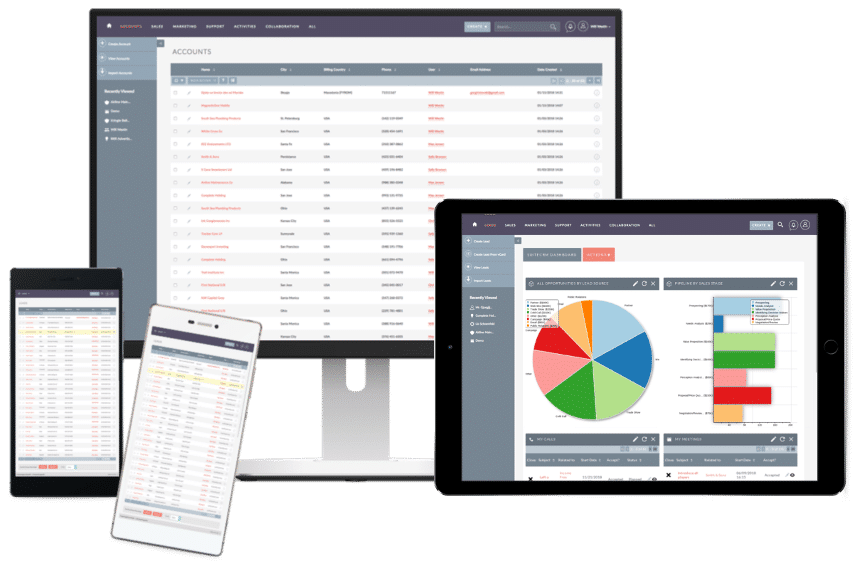
Best Open Source CRM Systems: Flexible and Cost-Effective Customer Management
Facebook Email LinkedIn Best Open Source CRM Systems: Flexible and Cost-Effective Customer Management Introduction In a world where customer relationships define business success, CRM (Customer Relationship Management) systems have become essential. But not every business can afford high-priced CRM tools with ongoing subscription fees. That’s where open source CRM solutions come in. Open source CRMs offer powerful features at zero cost, with full customization flexibility—making them ideal for startups, small businesses, and developers. What is an Open Source CRM? An open source CRM is a customer relationship management platform whose source code is publicly available. This allows businesses to modify, customize, and extend the CRM software based on their specific needs. Unlike proprietary CRMs, open source options are: Free to use Highly customizable Community supported Free from vendor lock-in Benefits of Open Source CRM Software Cost-Effective No licensing fees—perfect for budget-conscious businesses. Customizable Adapt the CRM to fit your business workflows and branding. Community Support Active user communities often provide plugins, documentation, and technical support. Data Ownership Your data stays in your own infrastructure when hosted locally or privately. Top 6 Open Source CRM Tools in 2025 1. SuiteCRM Based on SugarCRM’s open-source version Sales automation, marketing, customer support Self-hosted with strong community support Best For: Medium to large businesses needing enterprise-level CRM 2. EspoCRM Clean UI, fast, and lightweight Includes sales automation, project management, and workflows REST API for integrations Best For: Small to mid-sized companies and developers 3. Odoo CRM Part of the larger Odoo business suite (ERP, inventory, HR) Offers open-source and enterprise editions Highly modular Best For: Businesses seeking CRM with accounting and inventory features 4. VTiger CRM (Open Source Edition) All-in-one CRM with sales, marketing, and helpdesk features Easy to install and use Active forums and add-on community Best For: Startups and small businesses 5. YetiForce Modern, secure, and compliant with GDPR Includes inventory management, email marketing, and project tools Active development Best For: Companies that need high-security CRM systems 6. Crust CRM (Corteza CRM) Modern cloud-based CRM built on Corteza platform Integrates well with workflow automation tools Clean interface and user-friendly Best For: Cloud-native businesses and teams looking for scalability Key Features to Look For in an Open Source CRM Lead & contact management Pipeline & deal tracking Workflow automation Email & communication integration Analytics and reporting Mobile access API support Who Should Use Open Source CRM? Open source CRM is ideal for: Tech startups wanting to customize and scale Small businesses seeking a free and flexible solution Developers building tailored CRM features Organizations with strong internal IT support Considerations Before Choosing an Open Source CRM Technical Expertise: You may need developers for setup and maintenance. Hosting: Will you host it on your own server or a cloud platform? Security: Ensure regular updates and secure configurations. Scalability: Choose a CRM that grows with your business. Final Thoughts An open source CRM offers freedom, flexibility, and affordability. Whether you’re a small business owner or a developer building a custom solution, open source CRMs like SuiteCRM, EspoCRM, and Odoo can empower your customer relationship efforts without the high costs. Looking to set one up or compare them in detail? I can help guide you through the right choice based Free CRM on your needs.

Strategies to Streamline Operations and Maximize Growth
Facebook Email LinkedIn Business Efficiency: Strategies to Streamline Operations and Maximize Growth Introduction In today’s fast-paced and competitive world, business efficiency is more than just a buzzword—it’s a necessity. Efficient businesses reduce costs, increase productivity, and achieve long-term success by making the best use of their time, resources, and technology. This blog explores what business efficiency is, why it matters, and how to improve it with actionable strategies and modern tools. What is Business Efficiency? Business efficiency refers to how effectively a company uses its resources—time, money, people, and technology—to produce desired results. It’s about doing more with less without sacrificing quality or performance. An efficient business: Completes tasks faster Reduces waste and errors Delivers better customer service Saves money Adapts quickly to market changes Why Business Efficiency Matters Improving efficiency leads to: Higher profitability – By reducing costs and maximizing output Better customer experiences – Through quicker, more reliable service Scalability – Efficient systems can grow easily with your business Stronger competitive edge – You stay ahead in the market Employee satisfaction – Less stress and better tools mean happier staff Top Strategies to Improve Business Efficiency 1. Automate Repetitive Tasks Use tools like CRM systems, accounting software, and email marketing automation to reduce manual workload. Examples: Zapier for workflow automation QuickBooks for finance HubSpot or Salesforce for customer management 2. Streamline Communication Poor communication leads to delays and mistakes. Use unified communication platforms like Slack, Microsoft Teams, or Zoom to keep everyone connected. 3. Set Clear Goals and KPIs Having clear goals and Key Performance Indicators (KPIs) allows teams to stay focused and measure progress effectively. 4. Eliminate Wasteful Processes Review and improve inefficient workflows using Lean or Six Sigma methods. Cut down steps that don’t add value to the final product or service. 5. Use Cloud-Based Tools Adopting cloud technology allows teams to access files, collaborate, and work from anywhere—boosting flexibility and efficiency. Examples: Google Workspace Dropbox Business Notion 6. Train and Upskill Employees Employees equipped with the right skills and knowledge can work faster and smarter. Invest in regular training and development. 7. Outsource Non-Core Tasks Outsource time-consuming or specialized tasks like IT, payroll, or content creation so your core team can focus on business-critical activities. 8. Track Time and Productivity Use time-tracking apps like Toggl, Clockify, or RescueTime to monitor work hours and identify productivity gaps. Tools That Improve Business Efficiency Tool Type Recommended Tools CRM & Sales HubSpot, Zoho CRM Project Management Asana, Trello, ClickUp Accounting QuickBooks, FreshBooks Communication Slack, Zoom Time Tracking Toggl, Clockify File Sharing Google Drive, Dropbox Real-World Example Example: A mobile phone repair shop using CRM software can schedule appointments, track inventory, send automated follow-ups, and manage invoices—all from one dashboard. This reduces manual work and improves customer experience, which boosts overall efficiency. Final Thoughts Improving business efficiency doesn’t require huge investments. It starts with evaluating your current processes, identifying bottlenecks, and applying smart strategies and tools. When your operations run smoothly, your business grows stronger. Focus on continuous improvement, invest in the right systems, and empower your team for long-term success.